Managed colocation gives Canadian businesses a way to keep ownership of their servers while moving that equipment into a professional data centre built for power protection, cooling, connectivity, security, and technical access. Instead of keeping critical infrastructure in an office server closet or small on-premises rack, businesses can place their hardware in a purpose-built facility and receive support for the physical environment around it.
For IT managers, MSPs, SaaS companies, business owners, and infrastructure teams, the decision is not only about rack space. The data centre also needs to support power draw, bandwidth, public IPs, remote hands, remote reboot, carrier-neutral connectivity, physical security, cooling, after-hours access, and a growth path from one server to a larger private cabinet.
Managed colocation is often a practical fit when a business wants more hardware control than cloud hosting provides, but does not want to handle every physical infrastructure task internally. Before choosing a provider, define what your servers need today and what they may need over the next 12 to 24 months.
What Managed Colocation Means for Canadian Businesses
Managed colocation is a data centre service where a business places its own servers or network equipment inside a third-party facility and receives support beyond basic space, power, and connectivity. The “managed” part usually refers to access-related services such as remote hands, remote reboot, equipment checks, cabling assistance, Smart Out-of-Band access, and support for certain physical tasks.
Managed colocation does not automatically mean the provider manages the operating system, applications, data, firewall rules, backups, or software administration. In most cases, the customer still controls those layers unless a separate managed services agreement is in place.
A practical way to understand it: colocation moves your physical equipment into a better infrastructure environment. Managed colocation adds a support layer so your team does not need to be on-site for every cable check, power cycle, or basic hardware task.
What the Business Owns and Controls
In a managed colocation setup, the business usually owns the hardware, including servers, firewalls, switches, storage appliances, backup devices, or other network equipment. That ownership gives the business control over hardware specifications, operating systems, applications, security configuration, replacement cycles, and how the environment is used.
A SaaS company may want private infrastructure for predictable performance. An MSP may need dedicated hardware for client workloads. A business with legacy software may need to keep a specific server configuration because cloud migration could create risk, cost, or compatibility issues.
What the Data Centre Provider Supports
The data centre provider supports the physical environment that keeps equipment powered, cooled, connected, accessible, and protected. That includes UPS and generator-backed power, cooling, cabinet space, network connectivity, access control, and facility-level monitoring.
With managed colocation, the provider may also help with physical tasks that would otherwise require an internal technician to visit the facility, such as a controlled reboot, cable check, labelled drive replacement, or hardware status check.
Remote hands should always be clearly defined. It usually means physical assistance, not application support, cybersecurity management, database repair, or operating system troubleshooting.
Why “Managed” Changes the Colocation Experience
Basic colocation gives a business space, power, cooling, and network access. Managed colocation reduces the need for the customer to handle every physical event alone. If a server stops responding, the provider may be able to confirm physical status, perform a controlled power cycle, or assist through remote hands, depending on the support agreement.
Who Should Consider Managed Colocation?
Managed colocation is best suited for organizations that want physical infrastructure control but need a more stable and supported environment than an office rack or server room can provide.
Businesses With Physical Servers They Want to Keep
Many companies still have servers that are reliable, configured properly, and tied to important business operations. Replacing those systems with cloud infrastructure may not be necessary. In some cases, moving too quickly to cloud can introduce compatibility issues, licensing concerns, performance changes, or unpredictable monthly costs.
Managed colocation lets a business keep that equipment while improving the environment around it. A company may colocate a server running internal applications, file storage, databases, backups, private cloud resources, ERP systems, or specialized software.
For example, a professional services firm may have one production server and one backup device. The equipment may work well, but keeping it in an office exposes it to limited cooling, consumer-grade internet, building power issues, and restricted after-hours access. Moving that hardware into a managed colocation facility gives the business better infrastructure without forcing a full platform migration.
IT Teams That Need Remote Support Without Constant Site Visits
Managed colocation is practical when the IT team cannot visit the facility every time a physical task is needed. Remote hands and remote reboot can support routine events such as checking hardware status, confirming cables, restarting equipment, or assisting with basic device access.
For teams based in Toronto, Markham, the GTA, or elsewhere in Ontario, local colocation can reduce travel time while still keeping equipment within reach for planned maintenance. That matters when hardware work is occasional but business-critical.
A local data centre can also support hybrid work arrangements. An IT manager may work from home, a systems administrator may be in another city, and a vendor may only visit for scheduled hardware upgrades. Managed colocation gives those teams a more workable operating model.
MSPs, SaaS Companies, and Infrastructure Teams With Growing Needs
Managed service providers, SaaS businesses, and infrastructure teams often need more control than standard hosting provides. They may manage customer systems, private servers, network appliances, firewalls, storage arrays, monitoring tools, and backup infrastructure.
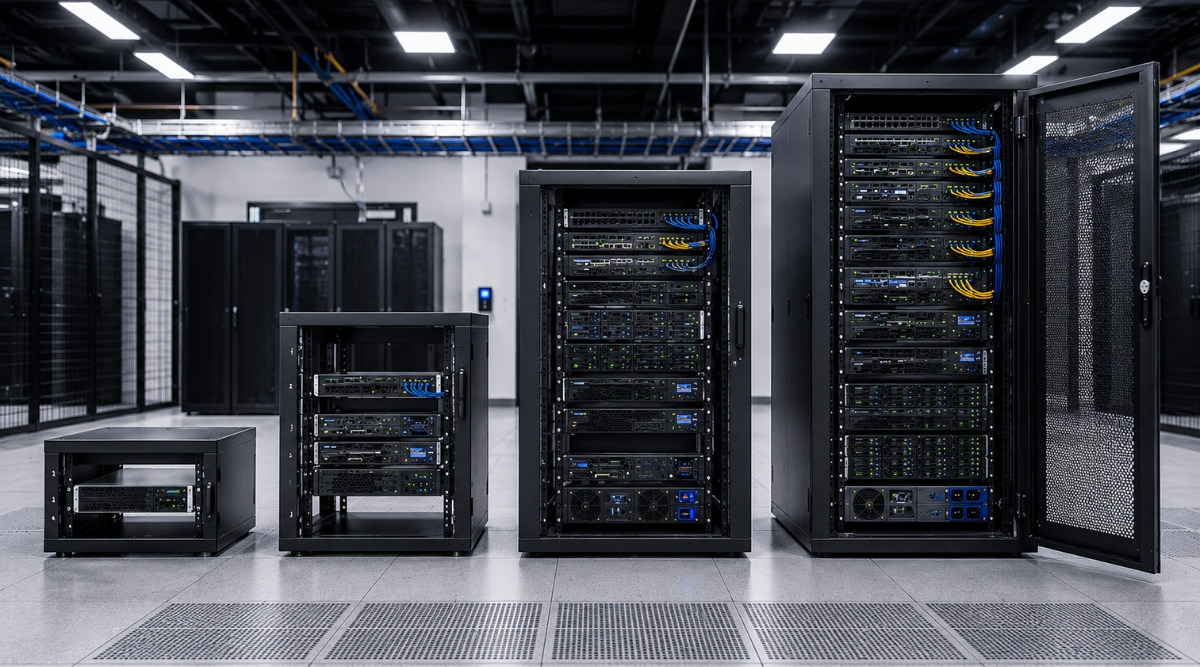
Managed colocation gives these teams room to grow. A small deployment may start with one server. As the environment expands, the business may need 10U, 20U, or a full 42U rack. Planning that growth path early helps avoid rushed migrations later.
For an MSP, a quarter rack may support several customer-facing systems, firewall equipment, and backup hardware. For a SaaS company, a half rack may provide room for production servers, storage, network gear, and redundancy. For a larger infrastructure environment, a full rack may support higher density, stronger power planning, and more formal access procedures.
Managed Colocation vs Unmanaged Colocation, Cloud Hosting, and Dedicated Hosting
Build a Faster, More Reliable Network with Nuday
Seamless connectivity, low-cost cross-connects, and top-tier carriers.The 7 Checks Before Choosing a Managed Colocation Provider
1. Rack Size and Future Growth
Rack size determines how much equipment can be installed. A single 1U server may be enough for a basic deployment, but a growing business may also need space for firewalls, switches, storage, external backup devices, patch panels, or redundant hardware.
Before choosing a package, make a simple equipment list. Include each device, rack unit size, rail requirements, power requirements, airflow direction, and cabling needs. Then add likely growth for the next 12 to 24 months.
2. Power Availability and Redundancy
Power planning should be based on real equipment draw, not assumptions. Servers, switches, firewalls, and storage devices can consume different amounts of power depending on load, redundancy, and configuration.
Confirm available power capacity, voltage, UPS/generator protection, power bar type, and whether A-B power is available. If equipment requires 120V, 208V, or three-phase power, that requirement should be confirmed before the move.
3. Bandwidth, Port Speed, and Monthly Data Transfer
Bandwidth needs depend on the workload. A backup server, SaaS platform, media application, private cloud environment, or customer-facing system can create very different traffic patterns.
Before choosing a plan, estimate monthly data transfer, peak usage, port speed needs, and future growth. Some environments may be fine with 1Gbps. Others may need 10Gbps connectivity or a clear upgrade path.
Review whether the environment has nightly backups, replication jobs, daily customer access, remote staff usage, traffic spikes, or bandwidth overage rules. A server can be well configured and still underperform if the network plan is too small.
4. Public IP Allocation
Public IP allocation affects firewall design, VPNs, application access, monitoring, mail services, remote administration, and service separation. A small deployment may work with a /29 network. Larger environments may need a /28 or a more detailed IP plan.
Before migration, identify how many usable public IP addresses are required. Include production systems, firewalls, VPN endpoints, monitoring tools, backup services, mail servers, and staging environments.
5. Carrier-Neutral Connectivity
Carrier-neutral connectivity gives businesses more flexibility when choosing internet providers, redundancy paths, cross-connects, and network architecture. A carrier-neutral data centre can be especially valuable for businesses that want multi-homed connectivity or do not want to depend on one network provider.
When comparing Canadian colocation providers, ask which carriers are on-net, whether cross-connects are available, what redundancy paths exist, and whether the facility can support your latency and throughput requirements.
Nuday’s connectivity position is relevant here because the facility is carrier neutral and supports multi-homed internet service availability. For businesses with customer-facing applications or distributed users, network design should be treated as a core part of the colocation decision, not an add-on.
6. Remote Hands, Remote Reboot, and Smart Out-of-Band Management
Remote support is where managed colocation becomes operationally useful. Remote hands can help with physical tasks. Remote reboot can restart equipment when a device becomes unresponsive. Smart Out-of-Band management can give technical teams another access path when normal network access is unavailable.
In practice, this matters during real incidents. A firewall may stop responding after a rule change. A server may freeze during an update. A switch port may need verification. A technician may need to confirm whether a device is powered, connected, or showing hardware errors.
Before signing, ask what remote hands includes, whether after-hours support is available, how urgent requests are prioritized, whether technicians can power cycle equipment, whether Smart Out-of-Band management is available, which tasks are billed separately, and what falls outside the provider’s responsibility.
7. Facility Access, Security, Cooling, and Reliability
Facility design affects how safely and consistently servers operate. A strong colocation environment should provide controlled access, secure cabinets, reliable power, cooling capacity, network access, and practical maintenance procedures.
Ask about access cards, visitor rules, cabinet access, authentication, loading dock availability, parking, workspace, maintenance entry, and after-hours procedures. These details matter when the IT team needs to install hardware, replace equipment, or complete planned maintenance.
Nuday’s Markham facility includes features that matter in this type of evaluation, including raised floor design, under-raised-floor cabling, UPS/generator-backed power, customer lounge and workspace, truck-level loading dock, side maintenance entry, and controlled authentication to the data centre floor.
How to Choose Between Single Server, Quarter Rack, Half Rack, and Full Rack Colocation
The right colocation size depends on equipment count, power draw, network requirements, IP allocation, access expectations, and growth.
Single Server Colocation for 1U Server Setups
Single server colocation is suitable for businesses that need to house one physical server in a data centre. It may fit a small production environment, backup server, dedicated application server, or a server paired with a firewall and external backup device.
For smaller deployments, Nuday’s Single Server Colocation Plans support 1U and small server setups, including standard usage, combo setups, and higher data transfer requirements.
Quarter Rack 10U Colocation for Small Multi-Device Environments
A quarter rack is often a better fit when the business has several devices rather than one server. That may include multiple servers, a firewall, a switch, backup hardware, storage equipment, or monitoring appliances.
For teams that need more than one server but are not ready for a larger cabinet, Nuday’s Quarter Rack 10U Space+Power Packages offer private cabinet space for compact multi-device environments.
Half Rack 20U Colocation for Growing Infrastructure
A half rack gives growing teams more room for server density, cable management, redundancy, and equipment separation. Growing infrastructure teams can review Nuday’s Half Rack 20U Space+Power Packages when they need more cabinet capacity, stronger power planning, and room for future expansion.
Full Rack 42U Colocation for Dedicated Server Environments
A full rack is built for larger infrastructure environments such as SaaS providers, MSPs, backup platforms, private cloud systems, and network-heavy businesses. For larger deployments, Nuday’s Full Rack 42U Space+Power Packages support dedicated server environments with higher equipment density and more advanced power planning.
Managed Colocation vs Unmanaged Colocation
Managed Colocation vs Cloud Hosting
Managed Colocation vs Dedicated Hosting
Questions Canadian Businesses Should Ask Before Moving Servers Into a Data Centre
A successful colocation move starts with clear technical requirements. Before requesting a quote, document the current equipment list, expected growth, power needs, network requirements, public IP requirements, remote support expectations, and access requirements.
Ask:
How Much Rack Space Do We Need Today and Within the Next 12 to 24 Months?
How Much Power Does Each Device Draw Under Normal Load?
Do We Need 120V, 208V, Three-Phase Power, A-B Power, or Redundant Feeds?
Do Our Servers Have Rails and Proper Mounting Hardware?
How Much Monthly Data Transfer Do We Expect?
Do We Need 1Gbps or 10Gbps Connectivity?
How Many Usable Public IP Addresses Do We Need?
Which Carriers Are Available in the Building?
Are Cross-Connects Available?
Who Can Access the Cabinet?
What Support Is Available After Hours?
Can Technicians Power Cycle Equipment Remotely?
What Happens If Our Primary Network Access Fails?
Is Smart Out-of-Band Management Available?
Why Markham and the Greater Toronto Area Matter for Colocation
Location affects physical access, latency, shipping, maintenance planning, emergency response, vendor coordination, and business continuity.
A Markham data centre can be practical for businesses in Toronto, York Region, the GTA, and other parts of Ontario. IT teams may still need physical access for hardware upgrades, firewall replacements, audits, cabling work, or planned migrations. A local facility reduces the friction that comes with placing equipment far from the team responsible for it.
The GTA is also a strategic infrastructure location because it connects customers, vendors, branch offices, cloud services, and network providers. Nuday’s service profile also includes disaster recovery and business continuity readiness, data centre relocation support, business internet, and shipping, receiving, and storage.
Where Nuday Fits in a Managed Colocation Search
Nuday is a Canadian colocation data centre provider located in Markham, Ontario. For businesses comparing managed colocation near Toronto and the GTA, Nuday offers local facility access, scalable colocation packages, carrier-neutral connectivity, remote hands, Smart Out-of-Band management, and practical support features for visiting IT teams.
Canadian Managed Colocation in Markham
Nuday’s data centre is located at 231 Amber St. in Markham, near major GTA business corridors and close to Highway 404 and Highway 407. The facility was designed by Racon Datacentres Engineering and completed in 2015.
The building includes slab-to-slab cement walls, a 24-inch raised floor, under-raised-floor cabling, customer lounge and workspace, truck-level loading dock, side maintenance entry, and two levels of security authentication to enter the data centre floor.
Scalable Rack Choices From 1U to Full Rack
Nuday supports several colocation paths, including single server, quarter rack, half rack, and full rack setups. A smaller organization may begin with 1U colocation. A growing IT team may need 10U or 20U. A larger SaaS, MSP, or private infrastructure environment may require a full 42U rack with more advanced power and network planning.
Remote Support, Carrier-Neutral Connectivity, and Smart Out-of-Band Management
Nuday’s managed colocation offering is especially relevant for businesses that need more than a place to mount servers. The facility supports carrier-neutral connectivity, multi-homed internet service availability, on-net carrier access, and cross-connect possibilities.
Nuday also positions Smart Out-of-Band management as a key differentiator. For IT teams, out-of-band access can be valuable during recovery scenarios where regular network access is unavailable. Combined with remote reboot and remote hands, it gives teams more ways to respond when infrastructure needs attention.
Businesses comparing Canadian data centre providers can review Nuday’s managed colocation services to compare single server, quarter rack, half rack, and full rack paths.
Common Mistakes to Avoid Before Choosing Managed Colocation
Choosing Rack Space Based Only on Today’s Equipment
A business may start with one or two servers, but infrastructure rarely stays exactly the same. Firewalls, switches, backup appliances, storage systems, and monitoring devices can quickly require more space.
Before choosing cabinet size, plan for realistic growth. If new equipment is likely within the next year, a slightly larger footprint may prevent an avoidable migration.
Underestimating Power and Bandwidth Requirements
Power and bandwidth are often underestimated because teams focus on server count rather than workload behaviour. A server may fit physically but require more power than expected. A workload may run smoothly today but strain the network during backups, replication, customer spikes, or large file transfers.
Review actual usage data where possible. If current data is limited, document the hardware specifications and expected workload patterns before requesting a quote.
Comparing Providers Only by Monthly Price
Pricing matters, but it should not be the only decision point. Two providers may look similar on price while offering different levels of access, remote support, connectivity, public IP allocation, power capacity, cooling design, and facility convenience.
A better provider comparison includes rack space, cabinet type, power capacity, redundancy, port speed, bandwidth limits, public IP allocation, carrier availability, cross-connect availability, remote hands scope, after-hours support, physical security, cooling design, facility reliability, local access, shipping, receiving, storage, and relocation support.
Assuming Remote Hands Covers Full Server Administration
Remote hands usually means physical assistance, not full server administration. A technician may check lights, reseat cables, power cycle a device, or replace a labelled drive. That does not automatically include operating system troubleshooting, application repair, database work, software configuration, or cybersecurity management.
The boundary between facility support and managed IT services should be clear before an urgent issue occurs. That clarity protects both the customer and the provider during high-pressure support situations.
For businesses with mission-critical systems, Remote Hands can also support faster response during urgent incidents. Instead of waiting for someone to travel to the data centre, clients can request on-site support from Nuday’s technical team.
Find the Right Colocation Path
Nuday helps businesses compare managed colocation options based on hardware control, facility support, connectivity, rack space, and future growth.FAQs About Managed Colocation
Is managed colocation the same as managed hosting?
No. Managed colocation usually means the customer owns the physical server hardware and places it inside a data centre with added infrastructure support. Managed hosting usually means the provider owns or controls the hosting environment and manages more of the server stack.
Do I still control my servers in managed colocation?
Yes. In most managed colocation setups, the customer keeps control of the server hardware, operating system, applications, data, firewall rules, and security policies. The provider supports the data centre environment and agreed physical support tasks.
What is remote hands in a colocation data centre?
Remote hands is an on-site support service where data centre technicians perform physical tasks for the customer. Common tasks include checking server lights, confirming cables, power cycling equipment, replacing drives, or assisting with basic hardware access.
How do I know whether I need 1U, 10U, 20U, or 42U colocation?
The right colocation size depends on equipment count, rack units, power draw, bandwidth needs, public IP requirements, access needs, and expected growth. A single 1U server may suit a small setup, while 10U, 20U, or 42U space may fit larger infrastructure environments.
Is managed colocation better than cloud hosting?
Managed colocation can be better when a business needs physical server control, predictable infrastructure, custom hardware, private networking, or hybrid architecture. Cloud hosting may be better for workloads that need fast scaling without owning or maintaining physical equipment.
Key Takeaways Before You Commit
Managed colocation works best when a business wants physical server control with professional data centre infrastructure. It gives organizations a way to keep owned hardware while gaining better power, cooling, connectivity, physical security, and remote support than most office environments can provide.
Before choosing a provider, evaluate rack size, power, bandwidth, connectivity, public IP allocation, remote support, physical access, security, cooling, and facility reliability. Single server, quarter rack, half rack, and full rack setups serve different infrastructure stages, so the right choice should reflect both current requirements and expected growth.
After confirming rack space, power, bandwidth, and remote support needs, the next step is to request an official colocation quote.